struct Vertex {
    glm::vec3 pos;
    glm::vec3 color;
    glm::vec2 texCoord;

    ...

    static std::array<vk::VertexInputAttributeDescription, 3> getAttributeDescriptions() {
        return {
            vk::VertexInputAttributeDescription(0, 0, vk::Format::eR32G32B32Sfloat, offsetof(Vertex, pos)),
            vk::VertexInputAttributeDescription(1, 0, vk::Format::eR32G32B32Sfloat, offsetof(Vertex, color)),
            vk::VertexInputAttributeDescription(2, 0, vk::Format::eR32G32Sfloat, offsetof(Vertex, texCoord))
        };

        ...
    }
};简介
到目前为止我们打交道的几何体虽然已经投影到三维空间,但本身仍然完全扁平。本章会给位置加上 Z 坐标,为使用三维网格做准备。我们还会借助这第三个坐标,在当前方块上方叠一块方块,从而看到几何体未按深度排序时暴露出的问题。
三维几何体
把 Vertex 结构体中的位置改成三维向量,并同步更新对应的 vk::VertexInputAttributeDescription 里的 format:
接着更新顶点着色器,让它接受并变换三维坐标作为输入:把 inPosition 的类型从 float2 改成 float3:
struct VSInput {
    float3 inPosition;
    ...
};

...

[shader("vertex")]
VSOutput vertMain(VSInput input) {
    VSOutput output;
    output.pos = mul(ubo.proj, mul(ubo.view, mul(ubo.model, float4(input.inPosition, 1.0))));
    output.fragColor = input.inColor;
    output.fragTexCoord = input.inTexCoord;
    return output;
}
改完记得重新编译着色器!
最后,给 vertices 容器补上 Z 坐标:
const std::vector<Vertex> vertices = {
    {{-0.5f, -0.5f, 0.0f}, {1.0f, 0.0f, 0.0f}, {0.0f, 0.0f}},
    {{0.5f, -0.5f, 0.0f}, {0.0f, 1.0f, 0.0f}, {1.0f, 0.0f}},
    {{0.5f, 0.5f, 0.0f}, {0.0f, 0.0f, 1.0f}, {1.0f, 1.0f}},
    {{-0.5f, 0.5f, 0.0f}, {1.0f, 1.0f, 1.0f}, {0.0f, 1.0f}}
};
现在运行程序,结果应当和之前完全一样。 现在该添加一些额外几何体了:让场景更有意思,同时演示本章要解决的问题。 照下面的方式复制顶点,在当前方块正下方再定义一块方块的位置:
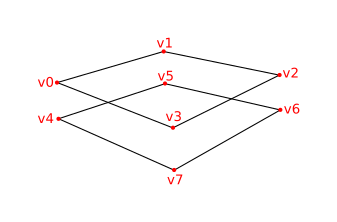
Z 坐标取 -0.5f,并为这块额外的方块补上对应的索引:
const std::vector<Vertex> vertices = {
    {{-0.5f, -0.5f, 0.0f}, {1.0f, 0.0f, 0.0f}, {0.0f, 0.0f}},
    {{0.5f, -0.5f, 0.0f}, {0.0f, 1.0f, 0.0f}, {1.0f, 0.0f}},
    {{0.5f, 0.5f, 0.0f}, {0.0f, 0.0f, 1.0f}, {1.0f, 1.0f}},
    {{-0.5f, 0.5f, 0.0f}, {1.0f, 1.0f, 1.0f}, {0.0f, 1.0f}},

    {{-0.5f, -0.5f, -0.5f}, {1.0f, 0.0f, 0.0f}, {0.0f, 0.0f}},
    {{0.5f, -0.5f, -0.5f}, {0.0f, 1.0f, 0.0f}, {1.0f, 0.0f}},
    {{0.5f, 0.5f, -0.5f}, {0.0f, 0.0f, 1.0f}, {1.0f, 1.0f}},
    {{-0.5f, 0.5f, -0.5f}, {1.0f, 1.0f, 1.0f}, {0.0f, 1.0f}}
};

const std::vector<uint16_t> indices = {
    0, 1, 2, 2, 3, 0,
    4, 5, 6, 6, 7, 4
};
现在运行程序,你会看到类似埃舍尔(Escher)错觉画的画面:
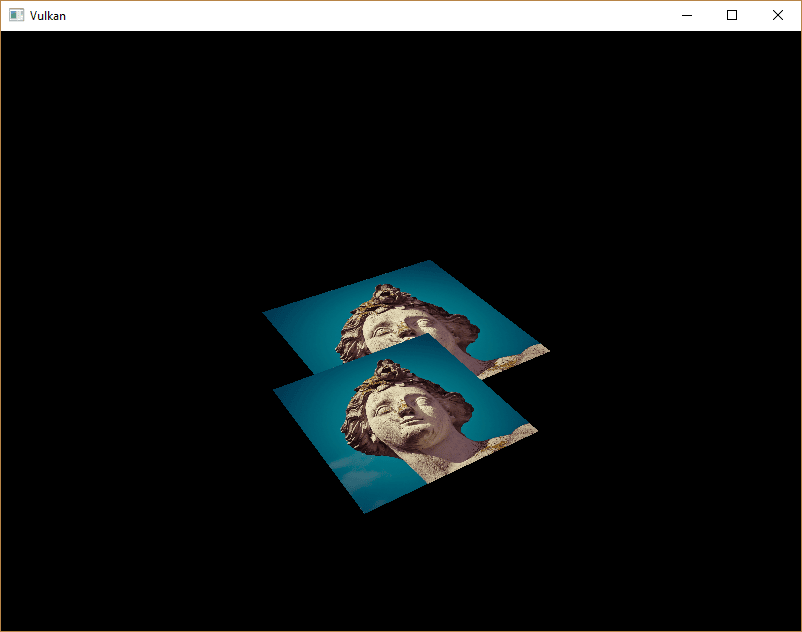
问题在于,下方方块的片元盖在了上方方块的片元之上,原因仅仅是它在索引数组里排在后面。 有两种解决办法:
-
按深度对所有绘制调用从后到前排序
-
使用深度缓冲区做深度测试
第一种做法常用于绘制透明物体,因为与顺序无关的透明本身就是一个难以解决的问题。 不过,按深度给片元排序的问题,更常见的解法是使用深度缓冲区(depth buffer)。 深度缓冲区是一份额外的附件,它像颜色附件记录每个位置的颜色那样,记录每个位置的深度。 光栅化器每产生一个片元,深度测试就会检查新片元是否比之前的片元更近。 如果不是,新片元就被丢弃。 通过深度测试的片元会把自己的深度写入深度缓冲区。 这个值同样可以在片元着色器中修改,就像你可以修改颜色输出一样。
#define GLM_FORCE_DEPTH_ZERO_TO_ONE
#include <glm/glm.hpp>
#include <glm/gtc/matrix_transform.hpp>
GLM 生成的透视投影矩阵默认使用 OpenGL 的深度范围 -1.0 到 1.0。
我们需要通过 GLM_FORCE_DEPTH_ZERO_TO_ONE 宏,让它改用 Vulkan 的 0.0 到 1.0。
深度图像与图像视图
深度附件同样以图像为基础,和颜色附件一样。 区别在于,交换链不会自动为我们创建深度图像。 我们只需要一张深度图像,因为同一时刻只有一个绘制操作在运行。 深度图像同样需要三件套资源:图像、内存和图像视图。
vk::raii::Image        depthImage       = nullptr;
vk::raii::DeviceMemory depthImageMemory = nullptr;
vk::raii::ImageView    depthImageView   = nullptr;
新建 createDepthResources 函数来创建这些资源:
void initVulkan()
{
    ...
    createCommandPool();
    createDepthResources();
    createTextureImage();
    ...
}

...

void createDepthResources()
{
}
创建深度图像相当直接。
它的分辨率应当与颜色附件相同,由交换链范围(extent)决定;用途要适合深度附件;使用最优平铺(optimal tiling)和设备本地内存。
唯一的问题是:深度图像该用哪种格式?
格式必须包含深度分量,在 vk::Format 中以 D?? 标示。
与纹理图像不同,这里不一定需要某个特定格式,因为我们不会在程序里直接访问纹素。 它只需要有合理的精度,实际应用中通常至少 24 位。 满足这一要求的格式有好几种:
-
vk::Format::eD32Sfloat:深度使用 32 位浮点数 -
vk::Format::eD32SfloatS8Uint:深度使用 32 位浮点数,外加 8 位模板(stencil)分量 -
vk::Format::eD24UnormS8Uint:深度使用 24 位浮点数,外加 8 位模板分量
模板分量用于 模板测试,它是一种可以与深度测试结合的额外测试。 后续章节会讲到。
我们完全可以只用 vk::Format::eD32Sfloat,因为它的支持极为普遍(可查硬件数据库);不过只要条件允许,给应用多留一点灵活性总是好的。
我们要写一个 findSupportedFormat 函数:它按从最想要到最不想要的顺序接收候选格式列表,找出其中第一个受支持的格式:
vk::Format findSupportedFormat(const std::vector<vk::Format>& candidates, vk::ImageTiling tiling, vk::FormatFeatureFlags features)
{
}
某个格式是否受支持,取决于平铺方式和用途,所以这两个也要作为参数传入。
格式的支持情况可以用 physicalDevice.getFormatProperties 函数查询:
for (const auto format : candidates) {
    vk::FormatProperties props = physicalDevice.getFormatProperties(format);
}
vk::FormatProperties 结构体包含三个字段:
-
linearTilingFeatures:线性平铺下支持的用途 -
optimalTilingFeatures:最优平铺下支持的用途 -
bufferFeatures:缓冲区支持的用途
这里只与前两个字段相关,具体检查哪一个由函数的 tiling 参数决定:
if (((tiling == vk::ImageTiling::eLinear) && ((props.linearTilingFeatures & features) == features)) ||
    ((tiling == vk::ImageTiling::eOptimal) && ((props.optimalTilingFeatures & features) == features)))
{
    return format;
}
如果所有候选格式都不支持所需用途,可以返回一个特殊值,也可以直接抛出异常:
vk::Format findSupportedFormat(const std::vector<vk::Format>& candidates, vk::ImageTiling tiling, vk::FormatFeatureFlags features) {
    for (const auto format : candidates) {
        vk::FormatProperties props = physicalDevice.getFormatProperties(format);

        if (((tiling == vk::ImageTiling::eLinear) && ((props.linearTilingFeatures & features) == features)) ||
            ((tiling == vk::ImageTiling::eOptimal) && ((props.optimalTilingFeatures & features) == features)))
        {
          return format;
        }
    }

    throw std::runtime_error("failed to find supported format!");
}
下面就用这个函数写一个 findDepthFormat 辅助函数,挑出一种带深度分量、且支持作为深度附件使用的格式:
vk::Format findDepthFormat()
{
    return findSupportedFormat({vk::Format::eD32Sfloat, vk::Format::eD32SfloatS8Uint, vk::Format::eD24UnormS8Uint},
                               vk::ImageTiling::eOptimal,
                               vk::FormatFeatureFlagBits::eDepthStencilAttachment);
}
注意这里要用 vk::FormatFeatureFlagBits,而不是 vk::ImageUsageFlagBits。
这些候选格式都带深度分量,但后两种还带模板分量。
我们暂时用不到模板,但在对这类格式的图像做布局转换时,必须把这一点考虑进去。
vulkan/vulkan_format_traits.hpp 头文件里提供了 vk::hasDepthComponent、vk::hasStencilComponent 这类简单的辅助函数。
在 createDepthResources 中调用该函数取得深度格式:
vk::Format depthFormat = findDepthFormat();现在所需信息齐全,可以调用 createImage 和 createImageView 辅助函数了:
std::tie(depthImage, depthImageMemory) = createImage(swapChainExtent.width, swapChainExtent.height, depthFormat, vk::ImageTiling::eOptimal, vk::ImageUsageFlagBits::eDepthStencilAttachment, vk::MemoryPropertyFlagBits::eDeviceLocal);
depthImageView                         = createImageView(depthImage, depthFormat, vk::ImageAspectFlagBits::eDepth);
不过 createImageView 目前假定子资源永远是 vk::ImageAspectFlagBits::eColor,所以需要把这个字段改成参数:
vk::raii::ImageView createImageView(vk::raii::Image& image, vk::Format format, vk::ImageAspectFlags aspectFlags)
{
    ...
		vk::ImageViewCreateInfo viewInfo{
        ...
		    .subresourceRange = {.aspectMask = aspectFlags, ...}};
    ...
}
把该函数的所有调用点都改成正确的 aspect:
swapChainImageViews.emplace_back(createImageView(image, swapChainSurfaceFormat.format, vk::ImageAspectFlagBits::eColor));
...
depthImageView = createImageView(depthImage, depthFormat, vk::ImageAspectFlagBits::eDepth);
...
textureImageView = createImageView(*textureImage, vk::Format::eR8G8B8A8Srgb, vk::ImageAspectFlagBits::eColor);
深度图像到此创建完毕。 我们不需要映射它,也不需要把别的图像拷贝进来,因为我们会像处理颜色附件那样,在命令缓冲区开头将它清除。
命令缓冲区
清除值
现在有多个附件需要在 vk::AttachmentLoadOp::eClear 下清除(颜色和深度),因此也要指定多个清除值。
转到 recordCommandBuffer,再声明一个 vk::ClearValue 变量 clearDepth 并加入:
vk::ClearValue clearColor = vk::ClearColorValue(0.0f, 0.0f, 0.0f, 1.0f);
vk::ClearValue clearDepth = vk::ClearDepthStencilValue(1.0f, 0);
在 Vulkan 中,深度缓冲区的深度范围是 0.0 到 1.0,其中 1.0 位于远视平面,0.0 位于近视平面。
深度缓冲区中每个点的初始值应当是最远的可能深度,也就是 1.0。
动态渲染
深度图像已经就绪,接下来要在 recordCommandBuffer 里使用它。
这部分属于动态渲染,与设置颜色输出图像很相似。
先为深度图像指定一个新的渲染附件:
vk::RenderingAttachmentInfo depthAttachmentInfo = {
    .imageView   = depthImageView,
    .imageLayout = vk::ImageLayout::eDepthAttachmentOptimal,
    .loadOp      = vk::AttachmentLoadOp::eClear,
    .storeOp     = vk::AttachmentStoreOp::eDontCare,
    .clearValue  = clearDepth};
再把它加入动态渲染信息结构体:
vk::RenderingInfo renderingInfo = {
    ...
    .pDepthAttachment     = &depthAttachmentInfo};
显式转换深度图像的布局
和颜色附件一样,深度附件必须处于符合预期用途的正确布局。 为此需要额外插入一个屏障,确保深度图像在渲染期间能作为深度附件使用。 深度图像首次被访问是在早期片元测试(early fragment test)管线阶段;由于加载操作是清除,访问掩码应当指定为写。
现在多了一种图像类型(深度),先在 transition_image_layout 函数里增加一个表示图像 aspect 的参数:
void transition_image_layout(
    ...
    vk::ImageAspectFlags    image_aspect_flags)
{
    vk::ImageMemoryBarrier2 barrier = {
        ...
        .subresourceRange    = {
            .aspectMask     = image_aspect_flags,
            .baseMipLevel   = 0,
            .levelCount     = 1,
            .baseArrayLayer = 0,
            .layerCount     = 1}};
}
然后在 recordCommandBuffer 中命令缓冲区的开头,加上这次新的图像布局转换:
commandBuffers[currentFrame].begin({});
// 开始渲染前,把交换链图像转换到 vk::ImageLayout::eColorAttachmentOptimal
transition_image_layout(
    ...
    vk::ImageAspectFlagBits::eColor);

// 把深度图像转换到深度附件最优布局
transition_image_layout(
    *depthImage,
    vk::ImageLayout::eUndefined,
    vk::ImageLayout::eDepthAttachmentOptimal,
    vk::AccessFlagBits2::eDepthStencilAttachmentWrite,
    vk::AccessFlagBits2::eDepthStencilAttachmentWrite,
    vk::PipelineStageFlagBits2::eEarlyFragmentTests | vk::PipelineStageFlagBits2::eLateFragmentTests,
    vk::PipelineStageFlagBits2::eEarlyFragmentTests | vk::PipelineStageFlagBits2::eLateFragmentTests,
    vk::ImageAspectFlagBits::eDepth);
与颜色图像不同,这里不需要多个屏障。
一帧结束后我们不再关心深度附件的内容,因此始终可以从 vk::ImageLayout::eUndefined 转换过来。
这个布局的特殊之处在于:你总能把它当作源布局,不必关心在此之前发生了什么。
同时别忘了调整 transition_image_layout 的其余调用,传入正确的图像 aspect:
// 开始渲染前,把交换链图像转换到 COLOR_ATTACHMENT_OPTIMAL
transition_image_layout(
    ...
    // 颜色图像同样需要指定这一项
    vk::ImageAspectFlagBits::eColor);
深度与模板状态
深度附件现在已可使用,但深度测试还需要在图形管线中启用。
它通过 vk::PipelineDepthStencilStateCreateInfo 结构体配置:
vk::PipelineDepthStencilStateCreateInfo depthStencil{
    .depthTestEnable       = vk::True,
    .depthWriteEnable      = vk::True,
    .depthCompareOp        = vk::CompareOp::eLess,
    .depthBoundsTestEnable = vk::False,
    .stencilTestEnable     = vk::False};
depthTestEnable 字段决定是否把新片元的深度与深度缓冲区比较,以判断它是否应被丢弃。
depthWriteEnable 字段决定通过深度测试的片元是否真的把新深度写入深度缓冲区。
depthCompareOp 字段指定保留或丢弃片元时执行的比较方式。
我们沿用深度值越小越近的约定,所以新片元的深度应当更小。
depthBoundsTestEnable、minDepthBounds 和 maxDepthBounds 字段用于可选的深度边界测试。
简单说,它让你只保留落在指定深度范围内的片元。
本教程不会使用这项功能。
stencilTestEnable、front 和 back 字段用于配置模板缓冲区操作,本教程同样不会使用。
如果你想用这些操作,就必须确保深度/模板图像所用的格式包含模板分量。
只要动态渲染的设置中包含深度模板附件,就必须指定深度模板状态:
更新 pipelineCreateInfoChain 结构体链,让它引用刚填好的深度模板状态,同时加上对所用深度格式的引用:
vk::StructureChain<vk::GraphicsPipelineCreateInfo, vk::PipelineRenderingCreateInfo> pipelineCreateInfoChain = {
    {.stageCount          = 2,
     ...
     .pDepthStencilState  = &depthStencil,
     ...},
    {.colorAttachmentCount = 1, .pColorAttachmentFormats = &swapChainSurfaceFormat.format, .depthAttachmentFormat = depthFormat}};
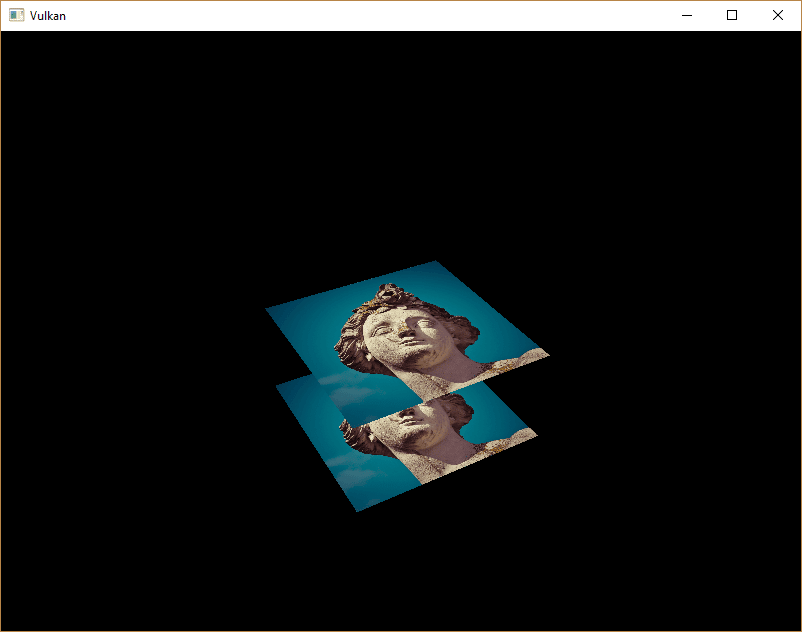
现在运行程序,应当能看到几何体的片元顺序已经正确:
处理窗口大小变化
窗口大小改变时,深度缓冲区的分辨率也应随之变化,以匹配新的颜色附件分辨率。
扩展 recreateSwapChain 函数,在这种情况下重建深度资源:
void recreateSwapChain()
{
    int width = 0, height = 0;
		while (width == 0 || height == 0)
		{
        glfwGetFramebufferSize(window, &width, &height);
        glfwWaitEvents();
		}

    device.waitIdle(device);

    cleanupSwapChain();
    createSwapChain();
    createImageViews();
    createDepthResources();
}
恭喜,你的应用终于可以正确渲染任意三维几何体了。 我们将在 下一章实际验证这一点:绘制一个带纹理的模型!
C++ 代码 / slang 着色器 / GLSL 顶点着色器 / GLSL 片元着色器